Enekui
Our own product · Saelyx

Sees, hears and acts with you in real time.

Saelyx is ours. It isn't client work, which is why it gets a page of its own instead of a card in the catalogue. It's published on the App Store in all 27 European Union countries and it's native on iPhone, iPad, Mac and Apple Watch. Here's what it does, who it's for and where you get it.

What it is

An assistant that attends to your screen, your camera and your voice in the same turn, and answers out loud.

Most assistants do one thing at a time: they read, or they listen, or they look. Saelyx does all three at once and reasons over them together. You show it your screen while you talk to it and hold something up to the camera, and it takes that as one situation.

It starts answering straight away and you can cut it off mid-sentence, the way you would a person. No waiting for it to finish before you change the subject.

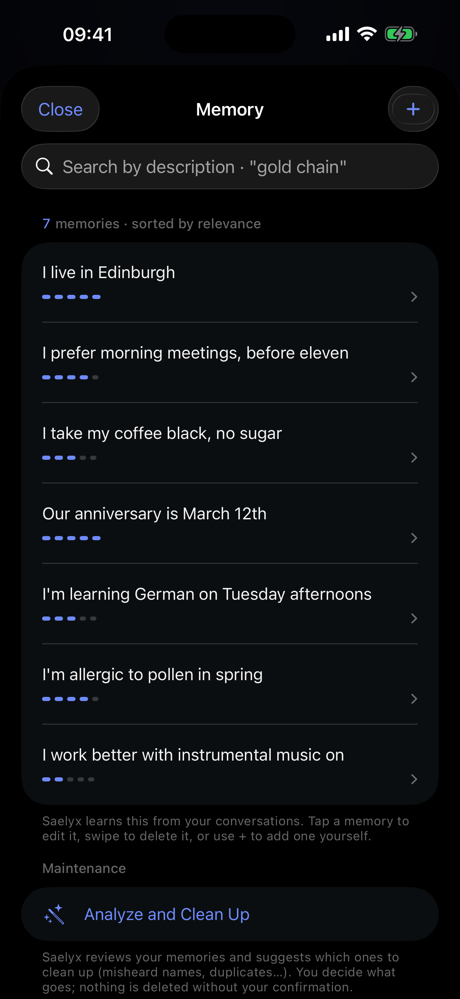
You never set the context up for it; it already has it. It remembers names, context and preferences between conversations, and that memory is a list of sentences in plain language you open, edit and wipe yourself. It isn't a black box.

It's the only entry on this site with no stack listed underneath, and that isn't an oversight. For the rest of the portfolio we publish the whole stack; for Saelyx we don't.

  • Sees your screen and answers about what's in front of you.
  • Reads whatever you hold up to the camera.
  • Listens continuously, with nothing to press.
  • Persistent memory you open, read, edit and wipe yourself.
  • Its own dictation keyboard, in any app on the system.
  • An Apple Watch app, so you can ask without taking out the phone.

The app was published on 4 August 2026; version 1.1 shipped on 26 August. That 1.1 is the App Store number: internally — and on the Mac app, downloaded separately — the numbering is a different one (0.10.x). Requires iOS 17 or macOS 13. Interface in Spanish and English. SAELYX trade mark applied for at the OEPM (M4385158); not granted yet.
SCREEN CAMERA VOICE ONE SINGLE ANSWER
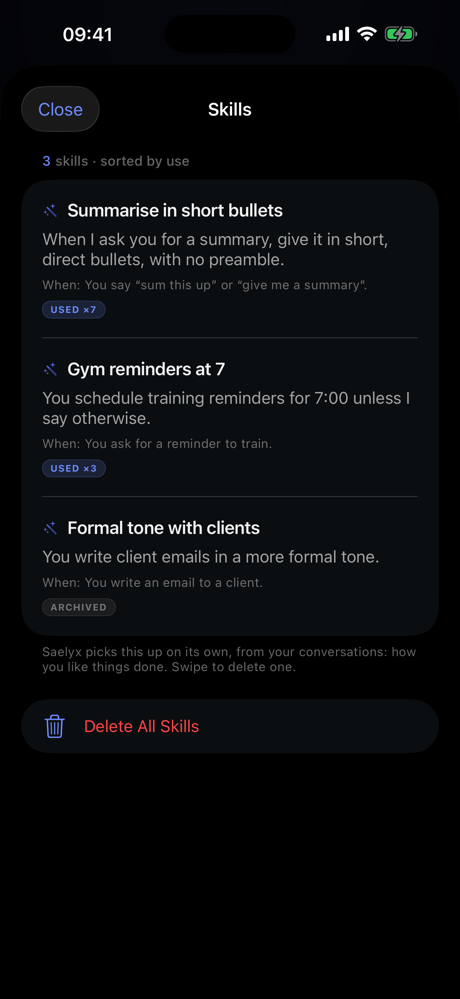
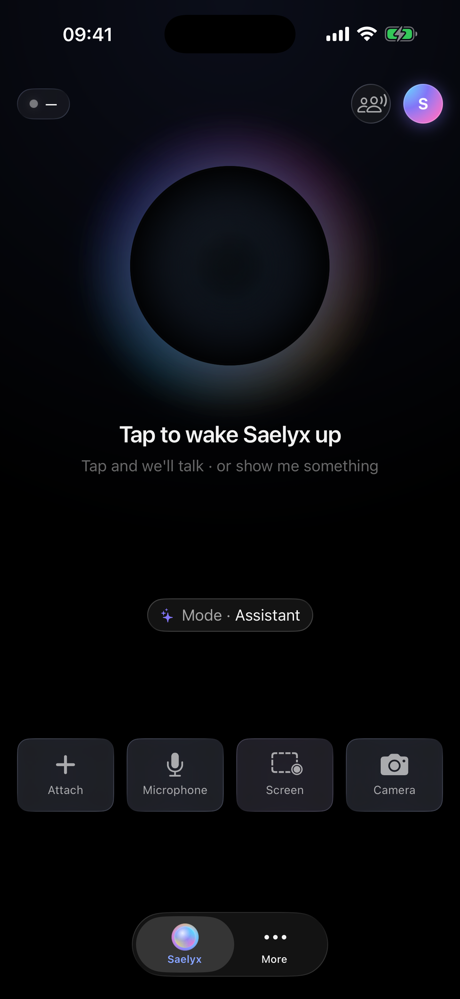
Saelyx on iPhone, opening screen: “Tap to wake Saelyx up” and, along the bottom, the attach, microphone, screen and camera buttons. Memory screen on iPhone: seven memories written as ordinary sentences, each with an arrow to open and edit it, and a search box on top. Skills screen on iPhone: three learned skills, each with the phrase that triggers it, and a button to wipe them all.
All three are the screenshots published on the App Store listing. Left to right: the inputs — microphone, screen and camera — on the opening screen; the memory, which is the list of sentences the paragraph above is talking about; and the skills it picks up, with the button that wipes them.

Who it's for, and what it solves

Saelyx isn't for everyone. It's built for people who work in front of a screen and would rather talk than type. These are the five concrete problems it solves.

  1. Explaining the context over and over. No pasting screenshots, no describing where you are: it looks at the screen you already have open and starts from there.
  2. Showing it something that isn't on the computer. A document on paper, a label, a part. Hold it up to the camera and it takes that in during the same turn you're speaking.
  3. Writing when your hands are already busy. It brings its own dictation keyboard that works in any app on the system, with a history of what you dictated in case something gets lost.
  4. Not knowing what an assistant remembers about you. Saelyx's memory is a list of readable sentences. You open it, edit it and wipe it without asking anyone.
  5. Asking it something without taking out your phone. That's what the Apple Watch app is for, and it's an application of its own, not a forwarded notification.

How you can tell it's native

"Native" gets said a lot and checked rarely. Here it means there are three separate applications, each compiled against its own operating system, and not one web page inside a window.

  1. Three applications, not one wrapped three times. One for iPhone and iPad, one for Mac, one for Apple Watch. Each is compiled against its own system and asks for its own minimum version: iOS 17, macOS 13, watchOS 11.
  2. The dictation keyboard is a system extension. It shows up wherever you type, inside other people's apps. A web page in a window cannot do that.
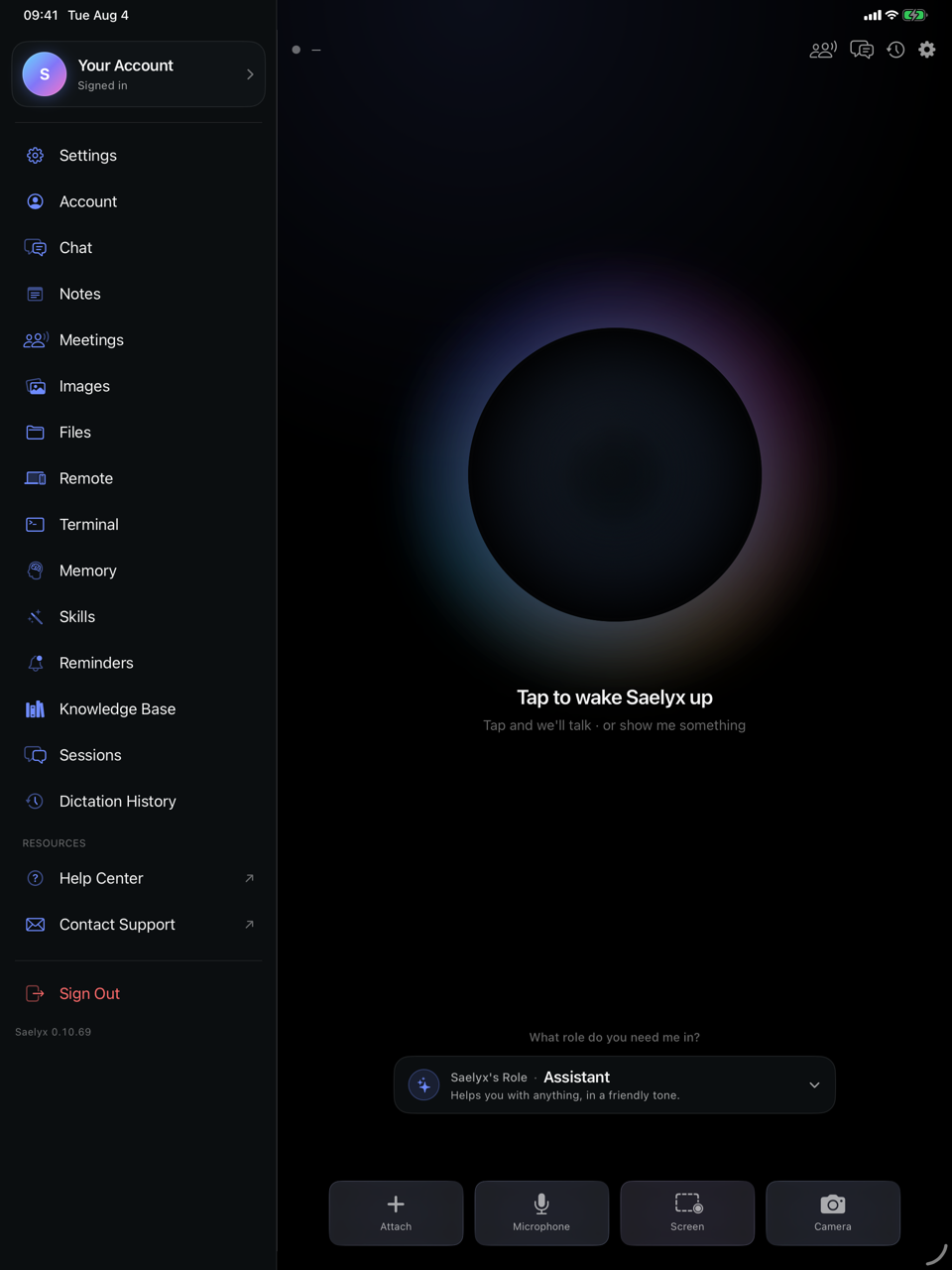
  3. The iPad build isn't the iPhone one stretched. It has its own sidebar and detail pane, because that's a different way of working.
  4. The Mac app is signed and notarised, and updates itself. You download it at saelyx.ai, it runs on Apple Silicon and Intel, and you install it by dragging it to Applications. No installer.
  5. The microphone is asked for once. The first time. After that it stops interrupting.
Saelyx on iPad: its own sidebar on the left listing the sections — Settings, Account, Chat, Notes, Meetings, Memory, Skills — with the conversation pane filling the rest of the screen.
The iPad, with its own sidebar and detail pane — point 3 of this list, in a screenshot from the App Store listing itself. The version number in the bottom left corner is the one the application carries internally, which is not the one the App Store publishes.

Where you get it

Four doors, and one of them is still shut. We'd rather you read that here than find it out after the download.

What you can check yourself

These five points are in writing on the App Store listing: a public, dated document that only we can edit. Apple hosts it and dates it; Apple doesn't verify it. So it isn't someone else's stamp — it's what we put in writing, and you can hold us to it.

  1. It says it is an artificial intelligence. Ask it whether it's a person and it answers that it isn't. That's article 50.1 of the European AI Act, and it was checked by asking the version that's in production, not by reading the code.
  2. Your voice and what you show it aren't kept to train models. They're processed in the moment.
  3. Data is stored encrypted on servers in Europe, tied to your account and nothing else.
  4. No advertising. Your data isn't sold or handed to third parties to profile you.
  5. Before doing anything that can't be undone, it asks you to confirm. And before storing anything sensitive it asks in writing, saying what, where, for how long and how to delete it.

Outside the European Union the listing isn't published: the United States and the United Kingdom, today, are not covered. The app has no public ratings yet, and we aren't going to show an average score that doesn't exist.

Why it sits on an agency website

Because it's the hardest proof of what we can build, and the only one we can show you end to end.

Saelyx isn't in the client catalogue and it isn't sold on this site. It's here because it passed Apple's review, it ships in twenty-seven jurisdictions, it declares itself an artificial intelligence when asked — article 50.1 of the European AI Act — and it lets the user delete their own memory. That's the bar we bring to every retainer.

Want something like this for your product? Tell Dori. No form, no funnel.

Talk to Dori